itch.io
Indie-friendly
Free download—no checkout. Grab the package and get updates through the itch app whenever a new version ships.
Download free on itch.ioVFX Vault brings a catalog into your Editor: scan your project, browse with thumbnails, and preview effects in context. Built for large libraries and third-party asset packs.
A Unity Editor window that stays out of your way. Search, filter, preview, and wire assets into your scene without leaving the editor.
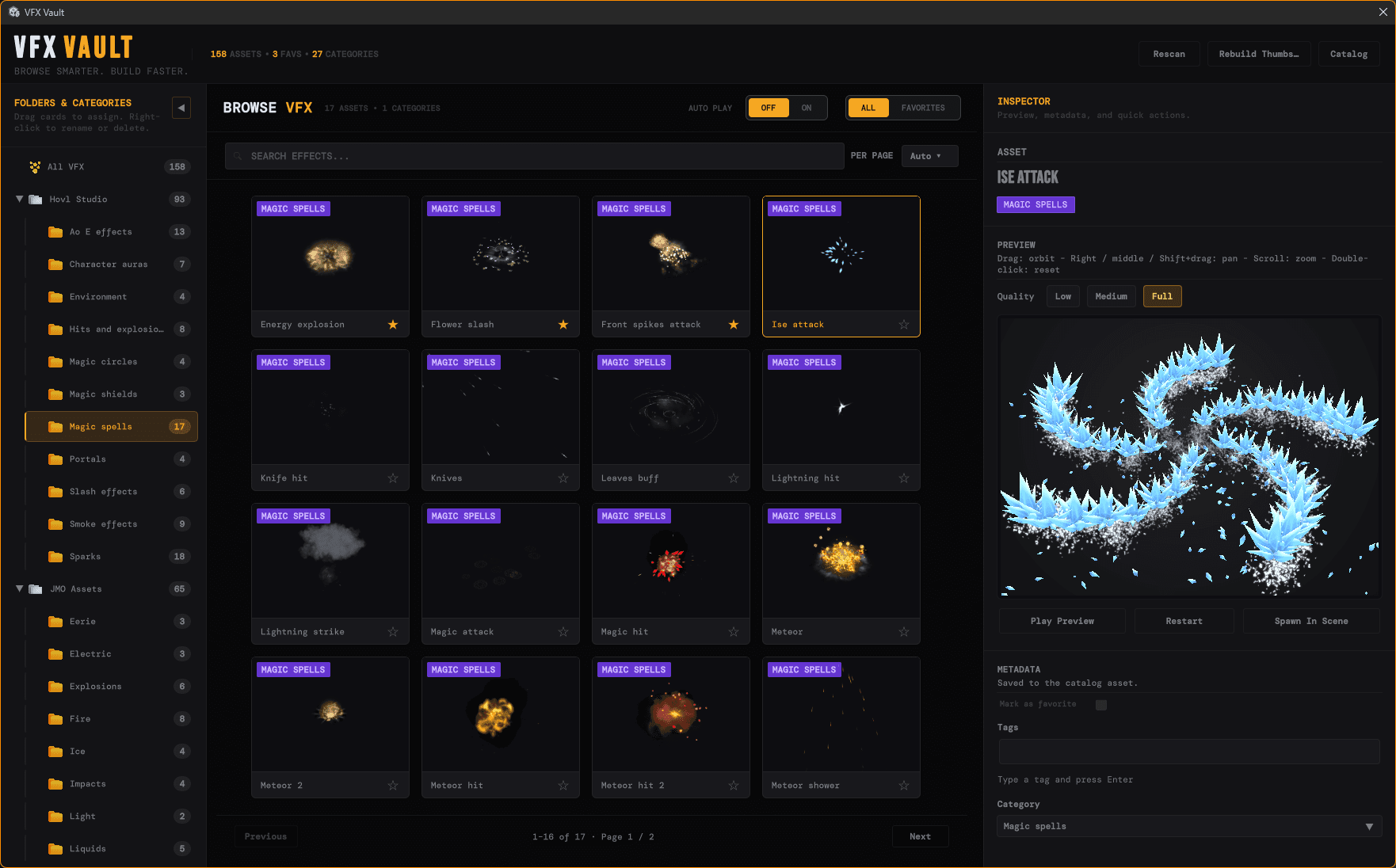
Search text, the active category, and Favorites mode work together to narrow the card grid. The window caches filtered results and schedules refreshes so the UI stays responsive on large libraries.
Responsive UIThe thumbnail system renders off-screen previews and saves PNGs under the generated asset folder. Rebuild thumbnails after big imports, and use manual or automatic page sizing so the grid fits your layout.
Visual browsingA persistent ScriptableObject catalog is the source of truth: GUIDs, paths, categories, tags, favorites, and thumbnail hashes. The sidebar mirrors that tree so you can organize assets the way your project thinks.
ScriptableObjectMark effects you reach for constantly, edit tags from the inspector, and assign entries to category nodes. That metadata lives in the catalog and survives Editor restarts.
Stays savedThe inspector loads the selected prefab into a hidden preview rig with orbit, pan, zoom, and playback controls. Tune preview quality when an effect is heavy. Low and Medium trim pixel scale to keep the Editor smooth.
InteractiveThe scanner discovers supported prefabs, refreshes catalog entries, and a pending-import banner nudges you to rescan when new VFX content lands so changes are never silent surprises.
Project-awareThe tool loads or creates the catalog asset, builds the UI Toolkit layout, and applies the packaged stylesheet so the three-column workspace matches the dark editor chrome you already use.
Supported prefabs are picked up by the project scan. Each match becomes or updates a catalog entry tied to your project's GUIDs and paths.
Entries carry metadata such as category, tags, favorite state, and thumbnail hashes, and the tool reads directly from that serialized database for instant browsing.
Off-screen preview renders produce PNG thumbnails on disk, giving every card a consistent visual read without loading the full effect until you select it.
Selecting an asset spins up the inspector preview session inside a hidden environment so you can orbit the effect, scrub time, and validate motion before committing it to a scene.
Favorites, category assignments, and tags write back to the catalog ScriptableObject, so the library you curate in-session is the same one you open tomorrow.
VFX Vault is free. Grab the Unity package from itch.io below—same catalog-driven workflow, no payment step.
Free download—no checkout. Grab the package and get updates through the itch app whenever a new version ships.
Download free on itch.ioStop hunting prefabs in the Project window. Rescan, favorite, and preview VFX in VFX Vault—one catalog-driven tool.